

Chapters · Chapter 4 of 8
Detect file-level changes
Refresh Head to identify files added, removed, or modified outside Pinman.
Joining here?
Stop Pinman, run this command, then start Pinman again. It rebuilds the sample project up to this point, discarding any work you have already done in it.
pinman tutorial goto filesWhat to expect#
So far you've captured and explored the state of the workstation applications. Now let's simulate changes made outside Pinman, as if readying the workstation for a production recording. You'll start with an update to its codec library, then use Pinman to see what changed.
The changes here are at file granularity. You'll refresh the Head view to see which codec files were added, removed, and modified. Changes to individual settings inside structured files, the Windows Registry, and Windows runtime settings come later.
Steps#
Simulate work: the codec update#
The tutorial’s drift command simulates work performed outside Pinman by
changing the fictional workstation files and settings. Use it now for the
workstation's codec-library update. The .codec files are small, fictional
binary packages, like files an application installer might replace.
-
Use the CLI to change the fictional files:
pinman tutorial drift work
The command modifies only the fictional workstation files inside the basics project. It performs the following edits:
- changes
web-delivery.codecfrom revision 12 to 13; - removes
legacy-mpeg2.codec; and - moves
available\hdr-passthrough.codecinto the activecodecsfolder.
Refresh the Head to see what changed#
Back in Pinman's Explore screen, the Explore toolbar shows that you're viewing the Head against the Checkpoint you took earlier. In the screenshot below, the freshness indicator reads between one and two hours old, and the orange Refresh button shows that the Head is stale. Your button may be green, orange, or red depending on how stale the Head is.

- Select Refresh in the toolbar, and wait for it to finish. Then press Close.
- If not already visible, expand Files → Production Workstation → applications → media-encoder → codecs.
The refreshed tree shows:
web-delivery.codecmodified;legacy-mpeg2.codecremoved; andhdr-passthrough.codecadded.
The following screenshot shows all three file-level changes:
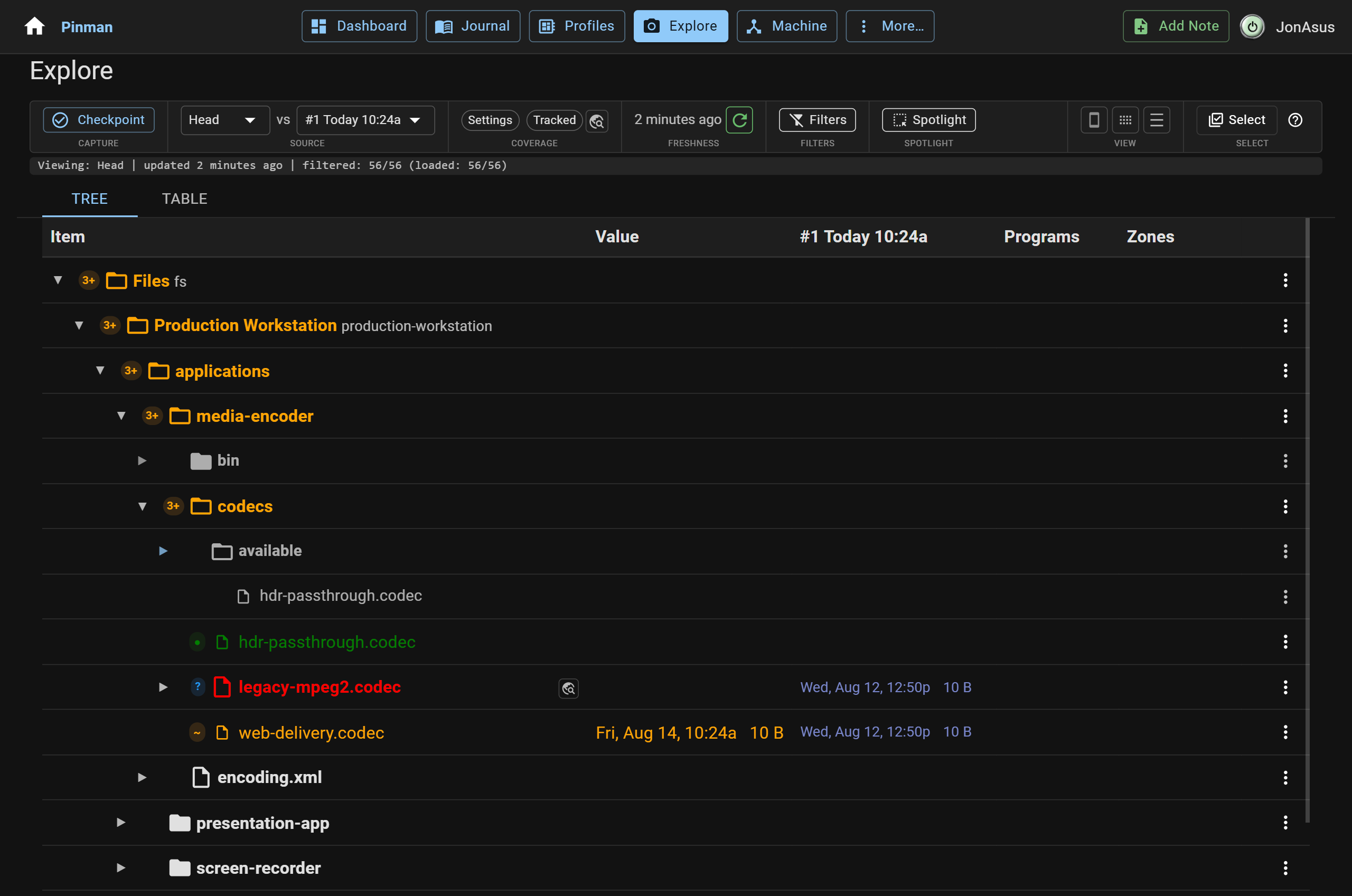
The .codec files are opaque binary packages, so Pinman tracks each one as a
whole file rather than parsing settings out of it.
Head versus frozen Captures#
A Checkpoint is a frozen Capture of the machine's state at a specific time. Pinman also keeps a Head Capture of the current, near-live state of the machine's files and settings.
As you expand or refresh the Head on the Explore page, Pinman reads current state and compares it with the Checkpoint being used as the reference. The toolbar's freshness indicator tells you how stale the Head is, and Refresh updates the entire Head.
What we did#
You changed some files outside of Pinman, then refreshed a stale Head to see what had changed since the last Checkpoint.
Let's continue setting up the fictional video-production apps for final recording.
Instructions#
-
Use the CLI to change the fictional files:
pinman tutorial drift work -
Select Refresh in the toolbar, and wait for it to finish. Then press Close.
-
If not already visible, expand Files → Production Workstation → applications → media-encoder → codecs.