

PINMAN 2 · VIRTUAL PINBALL

Keep your virtual pinball PC configuration under control.

Track the selected Windows, application, and device settings that make your cabinet work. See what changed, test alternatives, and move between working setups without restoring the entire PC or jumping between applications.

Built for the mix of front ends, simulators, display tools, audio tools, controllers, and supporting applications found in a virtual pinball cabinet.

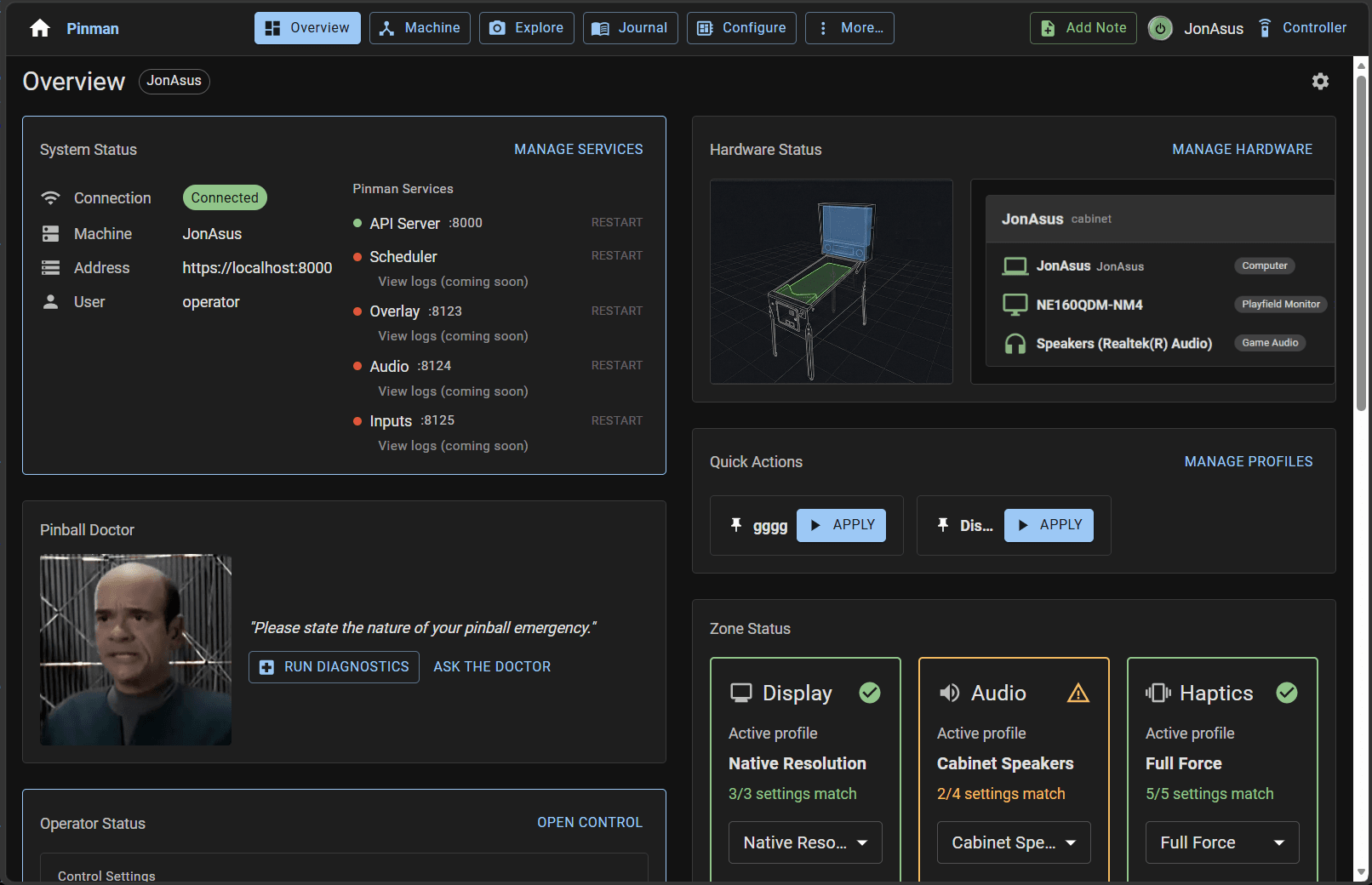
Pinman 2 Dashboard showing cabinet hardware, service status, Profiles, and Pinball Doctor
Early Pinman 2 interface on a virtual pinball cabinet.

READY TO START

Begin with a standard BallerInstaller configuration.

The BallerInstaller Kit is prepared to work out of the box with a standard BallerInstaller installation. It provides a practical starting point for Windows, PinUP System, Visual Pinball, Future Pinball, and the supporting software included with that setup.

Your cabinet does not have to remain standard. The supplied kit can be modified to match your software, hardware, paths, and preferences — and kits describe your setup, so a non-standard or hand-built cabinet can be covered too.

Community kit for use with BallerInstaller. Not affiliated with or endorsed by the BallerInstaller project.

VIRTUAL PINBALL, PHYSICALLY

A Windows PC at the center of a specialized cabinet.

Temporary photo slots show the intended composition. These labels will be removed when cabinet photography is supplied.

REAL CABINET WORK

Keep the experiments, fixes, and working setups that took time to get right.

DISPLAY + GRAPHICS

Try a different display and graphics setup.

Test a different playfield resolution, refresh rate, HDR setting, Visual Pinball rendering option, or GPU configuration. Compare the result and keep distinct quality and performance setups without losing the configuration you started from.

A move between 1080p and 4K can involve Windows display settings, Visual Pinball, the front end, backglass positioning, DMD placement, and other files. Pinman tracks the selected values together.

TROUBLESHOOTING

Find what changed while you were working.

Capture before you make changes, compare the Machine after each attempt, and record the work in the Journal.

When a simulator, front end, display, or audio setting stops behaving, you have evidence to pinpoint what changed, instead of a list of things you vaguely remember trying.

WORKING SETUPS

Maintain more than one valid configuration.

Keep separate Profiles for arrangements such as cabinet and VR, quiet and full-volume audio, or different display and performance modes.

Preview the target changes and apply only the settings involved.

PINMAN + AI

Give an agent the cabinet history it normally cannot see.

Pinman gives an AI agent the selected Machine state, Capture comparisons, Journal notes, and intended Profiles needed to reason about a configuration problem.

“Why did cabinet audio stop working after this PC was moved?”

The agent can compare the current audio devices and application settings with an earlier Capture, identify relevant differences, and explain a targeted correction. The Schema defines the specific locations Pinman may inspect or change.

Free supports reading, comparing, diagnosis, explanation, and applying existing Profiles. Pro adds authoring, restore, and direct tracked-value changes.

DOWNLOADABLE KITS

Add support without starting another Schema from scratch.

The BallerInstaller Kit is the starting point. Additional kits can add support for particular tools or cabinet arrangements.

Planned Pinman kits

  • DOF
  • PinVol
  • VPinStudio

Community contributors can publish kits for other tools and setups through the Pinman GitHub repository. Community kits are labeled separately from kits tested and released by Pinman.

Kit documentation and downloads will be added as the release catalog takes shape.

FREE AND PRO

Free is the core tier. Pro is a one-time unlock.

Free

The free Pinman 2 tier. Capture Checkpoints, compare the Machine, use the Journal, inspect Profile drift, apply supplied Profiles, and hand the phone remote to whoever runs the machine with Operator Mode.

Pro

Pro adds Schema and Profile authoring, Savepoints and restore, direct tracked changes, expanded automation, and the corresponding AI permissions in the same Pinman 2 installation.

PINMAN 2 CLOSED BETA

Help prepare Pinman 2 for real virtual pinball cabinets.

The closed beta needs advanced virtual-pinball users with standard and customized cabinets. Use Pinman on real configuration work, help refine the BallerInstaller Kit, and identify the tools and setups that need additional kits.

Every Pro capability is available during the beta. Beta access ends when Pinman 2.0 is released; Free remains the free tier after release.

Join the Pinman 2 beta

Be there for the launch.

Get an email when Pinman 2reaches public beta and release — no spam. Want in sooner? Check the box and we'll point you to the beta.

By submitting this form, you agree to the Website Terms of Use and acknowledge the Privacy Notice. We use double opt-in, and you can unsubscribe at any time.