
Operator Mode
Operator Mode
Operator Mode is the simple, phone-friendly way to run the machine — volume, brightness, on-screen messages, presets, schedules, and power. No configuration, no account. If someone gave you operator access, this is everything you can do.
Connect from your phone
Operator Mode is the phone-friendly remote built into Pinman 2. Once it's set up on the machine, it shows a QR code and a web address. Scan the code with your phone's camera — or open the address in any browser on the same network — to reach the control panel.
Add it to your phone's home screen and it behaves like an app. The first time you connect, enter the access PIN the machine's owner gave you. There's nothing to install on your phone.
Controls
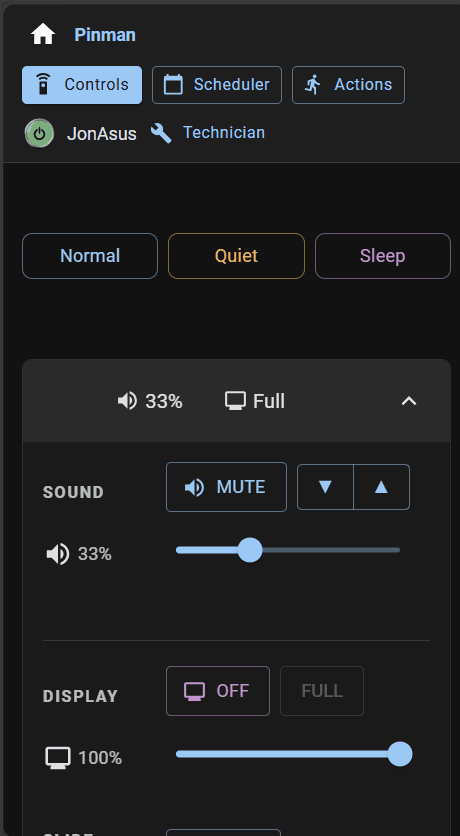
The control panel gives you master volume and mute, screen brightness, and a blank-screen toggle. Post a message that overlays the display, or start a slideshow over an idle machine. Everything applies live — no restart, no walking over to the cabinet.
Presets
Presets bundle volume, brightness, and display state into one tap. Pinman 2 ships with Normal, Quiet, and Sleep — switch the whole machine between them in a single action.
Scheduler & actions
Schedule actions to run on their own — drop to Quiet in the evening, Sleep overnight, wake in the morning. Set it once and the room manages itself.
Power
Shut down or reboot the machine remotely from the control panel when play is done for the night.